Category 01
Words that
move you
Toward an emotional reaction, toward a particular conclusion, toward a side.
- Balance
- Logic
- Autonomy
"Is this biased?" comes up at every reference desk and in every instruction session. Clear-Sight gives you a way to answer it that holds up the same way every time. Not a verdict on the source, a look at how the article is built. And an optional tool that can surface it for any news article.
Most approaches to information literacy ask your readers to judge. Judge the source. Judge the outlet. Judge the intent. The CSAF asks them to look. Ten observable language signals across three categories, used the same way in a one-shot, an embedded session, or a conversation at the desk.
We score articles, not outlets.
That distinction matters in a library. It keeps the conversation on what the reader can see in front of them, not on who they should trust.
Every article is doing three things with its language.
Toward an emotional reaction, toward a particular conclusion, toward a side.
About what is sourced, what is specific, what is claimed and supported.
Through context, complexity, and whether the shape holds.
Either the pattern is present, or it isn't.
That is what makes the method consistent across every session, and teachable by any librarian on your staff.
Read the full framework — three categories, ten signals, six patterns →
Information literacy is broader than the news. It is textual, visual, data, and digital. News is where the construction patterns are most visible, which makes it the most observable place to build a skill that carries into everything else your readers meet. A reader who can name what a news article is doing carries that same lens into a database result, a viral post, and an AI-generated summary.
Clear-Sight gives you a shared, repeatable method for that work — and the materials to deliver it. Two ways to bring it in:
Session plans, worked examples on real articles, and pattern walkthroughs — calibrated to the communities you serve. You run the session. The framework is content-agnostic, so it overlays whatever subject or collection you are working in, which means one method instead of a new one for every topic.
For libraries in our region, we will come facilitate a session for your readers — in person or remote. You see the method delivered before you ever teach it yourself, and your readers get a working introduction in a single sitting. We are starting close to home in New Jersey and the surrounding area, and growing out from there.
Either way, this accentuates the work you already do. It gives you a structured vocabulary and consistency across sessions, and it sits alongside the instruction you have built — not on top of it.
Bring a Program to Your LibraryEvery signal is grounded in language: word choice, sourcing structure, framing decisions. Readers identify patterns, not opinions. It replaces "I think it's biased" with "here's what I observe," which keeps you out of the verdict business and keeps the reader doing the looking.
The CSAF maps to the ACRL Framework for Information Literacy, AASL learner standards, ISTE, and UNESCO MIL. It works alongside the instruction you already deliver, as a shared analytical foundation rather than a replacement for it.
The same ten signals, every time, with every reader, taught by any librarian on your staff. A shared method instead of a personal one, so a reader who sits in two different sessions hears the same vocabulary twice.
Readers use Clear-Sight independently on real articles, not worksheets or hypotheticals. The sidebar surfaces the full analysis as they read, so the skill gets practiced on the things they actually open.
From a one-shot to an embedded series, the reference desk to an adult program — one method, every library, scaling across a system or consortium.
Aligned to the ACRL Framework for Information Literacy. A teachable instrument for one-shot instruction, embedded sessions, reference support, and a shared method beyond "check the source."
Request Library AccessA structured way to answer the bias question at the desk, and a framework that anchors adult and community programs on the news readers already follow.
Request Library AccessContent-agnostic, so it overlays any subject area, and built to accentuate the instruction you already deliver. Aligned to the news, media, and information literacy mandates now in effect across 11+ U.S. states.
Bring to Your SchoolOne method across every member library, with cooperative purchasing that scales the way your shared resources already do.
Explore a Consortium PartnershipThe CSAF builds on a decade of work defining what news literacy is — and what makes it teachable. The framework turns that research into an observable, session-ready instrument.
News literacy is the foundational gateway literacy — the skill that determines whether a reader can engage critically with media, digital, and AI content downstream.
How the CSAF builds on it: news is the most structured, observable form of persuasive media, and the natural starting point for skill transfer.
84% of teens distrust the news, and 80% are inclined to believe online conspiracy theories.
How the CSAF responds: trust gaps close when readers learn to observe what an article is doing, not when they are told what to believe.
Media and information literacy is the set of competencies that lets people engage with information and media critically, ethically, and effectively.
Standards alignment: the CSAF's ten signals map to UNESCO MIL competencies, the ACRL Framework, AASL learner standards, and ISTE.
Read the methodology paper: News Literacy as Observation, Not Judgment →
The Chrome and Edge extension delivers the full framework on any article a reader opens. Every signal, every score, every piece of evidence — visible in the sidebar as they read.
Readers see what the article is doing before they form an opinion about what it says — the framing choices, the language patterns, the structural decisions, all explained in plain language with evidence pulled from the text.
A pre and post comprehension assessment built around the framework itself. Readers take it before a program and again after. The comparison view shows where their pattern recognition actually moved — by observable signal, not by self-reported confidence. It is the artifact you bring to a program review or a board report.
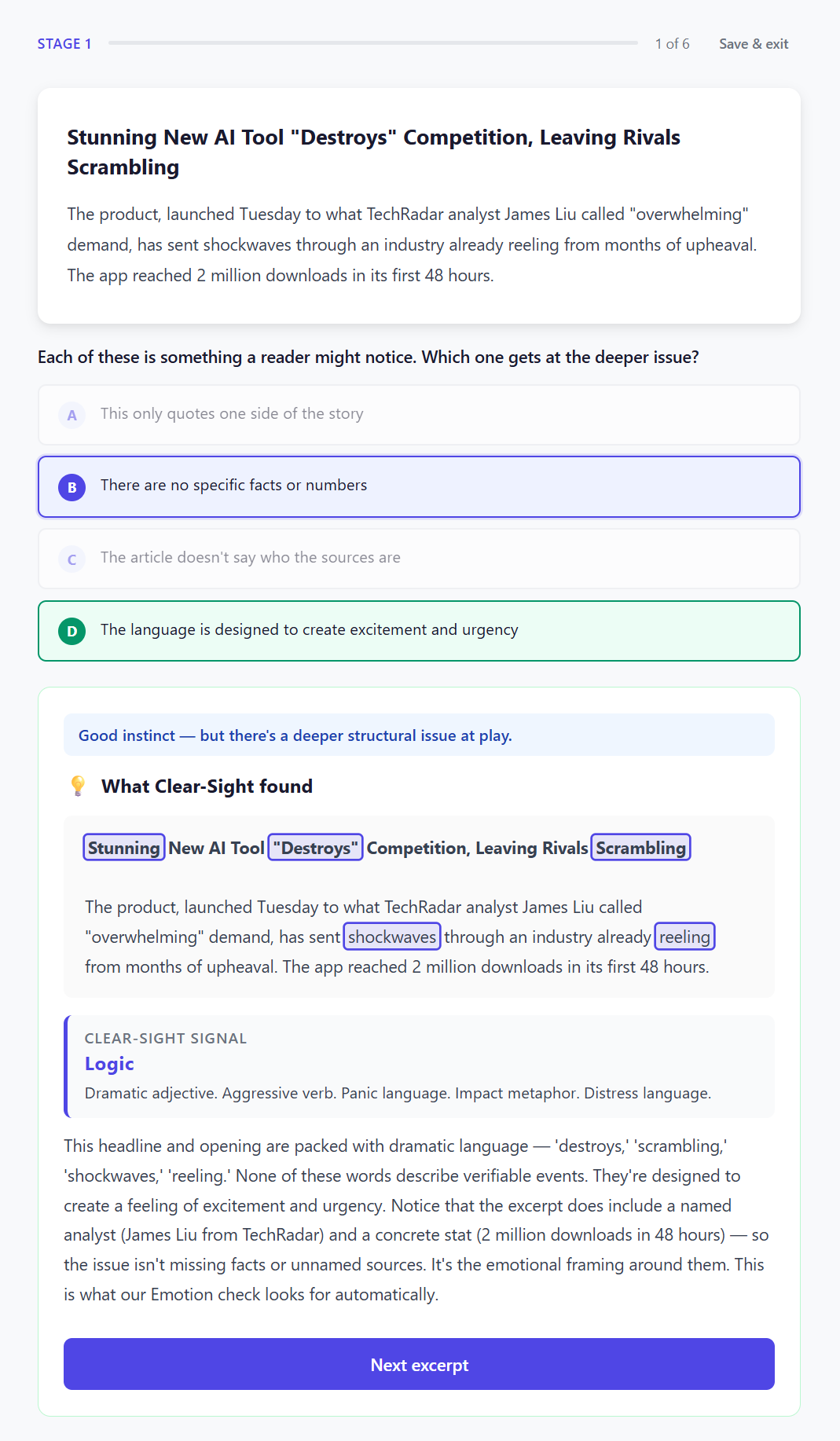
Pattern recognition tasks tied to specific framework signals — not vocabulary recall, not credibility judgment.
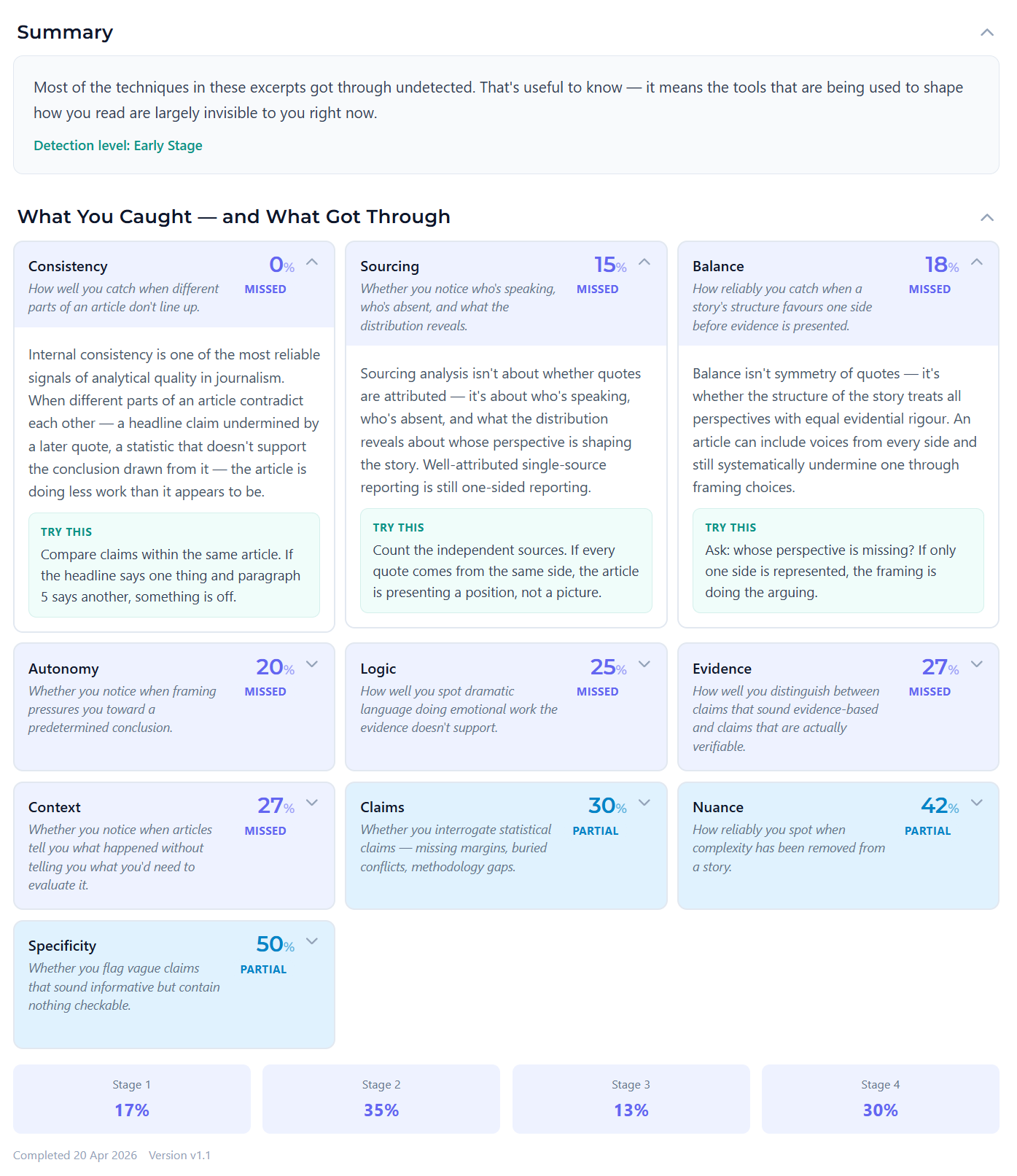
Each reader's performance broken down across the ten framework signals — surfacing the patterns they read well and the ones they need more practice with.
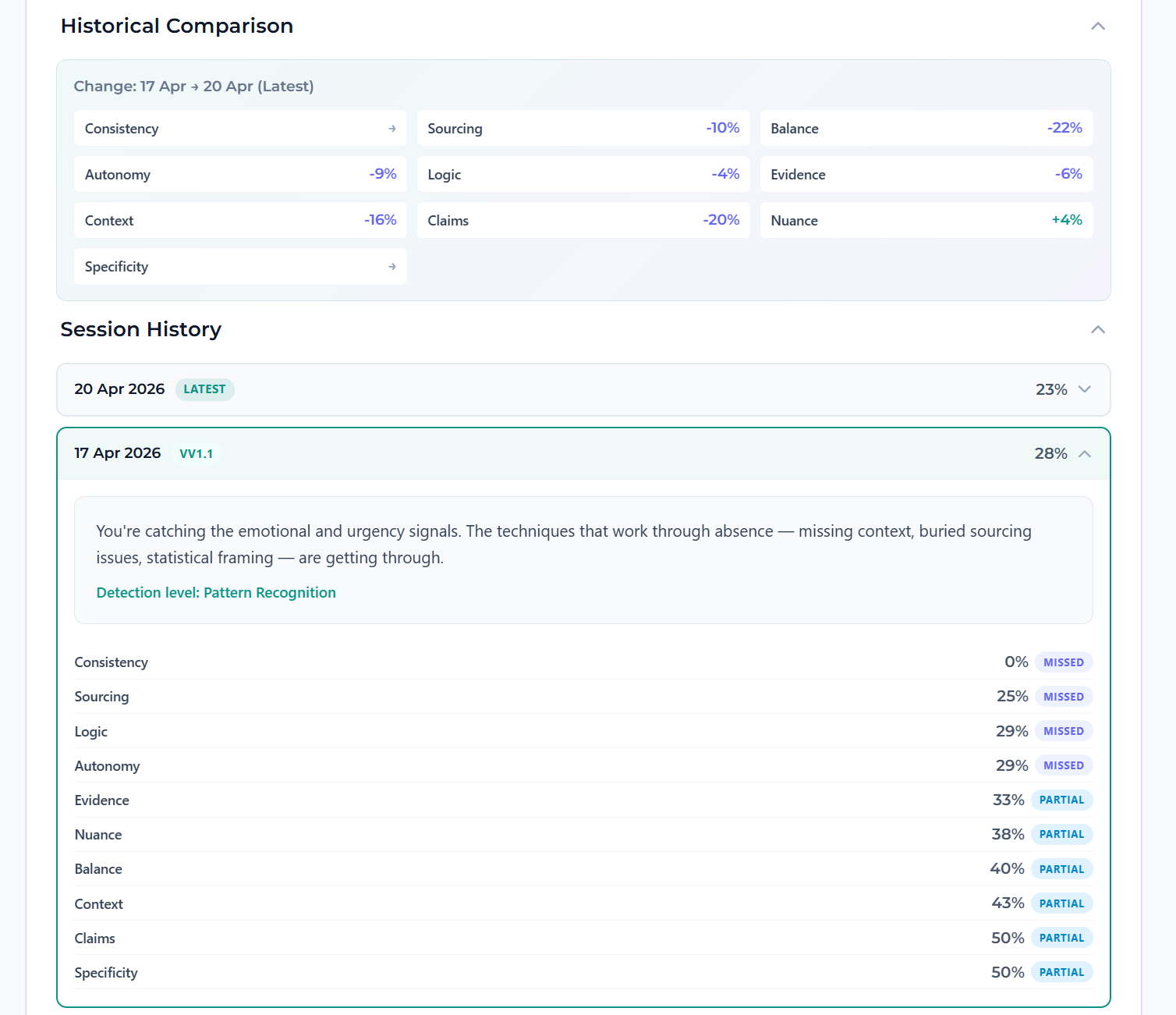
Side-by-side gains in observable comprehension. The artifact you bring to a program review or a board report.
The full product, with limited credits — so you can decide if it fits your library program before involving procurement.
Everything in the demo with no credit limits, plus the licensing, reporting, and support that scale across the community you serve.
Pricing: the 30-day demo is fully featured with no credit card. After that, individual librarians can upgrade or roll into an institutional license, and consortia can set up cooperative purchasing. Get a quote →
Start with a free 30-day demo. No credit card required. The demo is the full product — every feature unlocked — with a credit cap of 10 article analyses and 4 Ask Clear-Sight questions. Enough to evaluate the framework with a real class or section before involving procurement.
Institutional pricing is per-seat and scales with headcount. A single high-school section, a department, a campus, and a full district are all common deployment sizes. Pricing depends on volume, deployment requirements, and PD scope. Request a quote.
Yes. The Clear-Sight extension requires a login to use — this is how usage is attributed, Knowledge Lens scores are tracked, and institutional seats are managed.
For individual librarians and readers on the 30-day demo: quick email-based sign-up via the sign-up page. No PII beyond the account email.
For institutional deployments: SSO (Google Workspace, Microsoft Entra) and roster-based provisioning (Clever, ClassLink) are not available out of the box today, but we'll explore the integration with you as part of an institutional engagement. Let us know your environment when you request access.
Clear-Sight is built for institutional environments. We collect no learner or patron PII beyond the account email, store no article content beyond what's needed to render the analysis, and process all extension activity over encrypted connections.
For higher ed and academic libraries: FERPA-compliant by design (no education records collected). Accessibility — we test against WCAG 2.1 AA and provide a VPAT on request. The ALA Library Bill of Rights and the patron-confidentiality posture libraries expect are honored: no patron-identifying logs, no targeting based on what someone reads.
For K-12: COPPA and state-specific data-privacy agreements (NY Ed Law 2-d, CSDPA, SOPIPA, etc.) signed as part of procurement review. Data Privacy Impact Statement and our security questionnaire responses available on request.
CSAF maps directly to the ACRL Framework for Information Literacy — specifically the frames around Authority Is Constructed and Contextual, Information Creation as a Process, and Information Has Value. The ten signals give librarians a concrete instrument to use during a one-shot session, an embedded course module, a research consultation, or an adult patron program.
Common deployment patterns we see: academic libraries embedding it in first-year writing, communication, and research methods courses; public libraries running adult patron workshops or making it available as a research-room tool; library systems licensing it across branches as part of digital and information literacy outreach.
Chrome and Edge on desktop and Chromebook. The extension installs from the Chrome Web Store; institutional deployments can push it via Google Admin Console / Microsoft Intune for managed devices.
Works through standard school content filters. Compatible with most LMS environments — Clear-Sight is the analysis layer, not the LMS.
Individual librarian: 5 minutes (install extension, sign in, start analyzing).
Branch / department pilot: typically 1–2 weeks — primarily IT review and managed extension deployment.
System / consortium rollout: 2–6 weeks depending on procurement timeline, security review, and program scope.
Not out of the box today — but we can explore it with you upon request. If SSO (Google Workspace, Microsoft Entra) or rostering (Clever, ClassLink) is a requirement for your deployment, tell us when you request institutional access and we'll scope the integration as part of your engagement.
Yes. We work with consortia, cooperatives, and library systems on shared licensing — one method across every member library, with cooperative purchasing that scales the way your other shared resources do. Tell us about your membership and how you purchase together when you request access, and we will scope a structure that fits.
Most bias tools rate outlets on a political scale. CSAF does something different. We do not classify outlets by lean and we do not tell readers what to think. We look at the words on the page. The framework groups its ten signals into three categories: words that move the reader, words that inform the reader, and words that frame the story. Each one leaves an observable trail. A reader who knows what to look for can see how an article is constructed and decide for themselves what to do with it. That is a more useful skill than knowing where a publication sits on someone else's chart.
It sits alongside the instruction you have built, not on top of it. The CSAF is a shared analytical foundation — a structured vocabulary and consistency across sessions — that accentuates the work you already do rather than replacing it. The framework is content-agnostic, so it overlays whatever subject or collection you are working in, which means one method instead of a new one for every topic. Read the methodology →
Start a free demo, or reach out about a session for the community you serve. We are running programs in the New Jersey area now and expanding from there.
Chrome & Edge browser extension. Works in institutionally-managed environments. Login required — SSO and rostering explored upon request for institutional deployments. Privacy policy
Read Deeper. Engage Better.